# fzf-lua
**Repository Path**: sunn4mirror/fzf-lua
## Basic Information
- **Project Name**: fzf-lua
- **Description**: No description available
- **Primary Language**: Unknown
- **License**: MIT
- **Default Branch**: main
- **Homepage**: None
- **GVP Project**: No
## Statistics
- **Stars**: 0
- **Forks**: 0
- **Created**: 2025-11-17
- **Last Updated**: 2025-11-17
## Categories & Tags
**Categories**: Uncategorized
**Tags**: None
## README
# fzf :heart: lua

[Quickstart](#quickstart) • [Installation](#installation) • [Usage](#usage) • [Commands](#commands) • [Customization](#customization) • [Wiki](https://github.com/ibhagwan/fzf-lua/wiki)
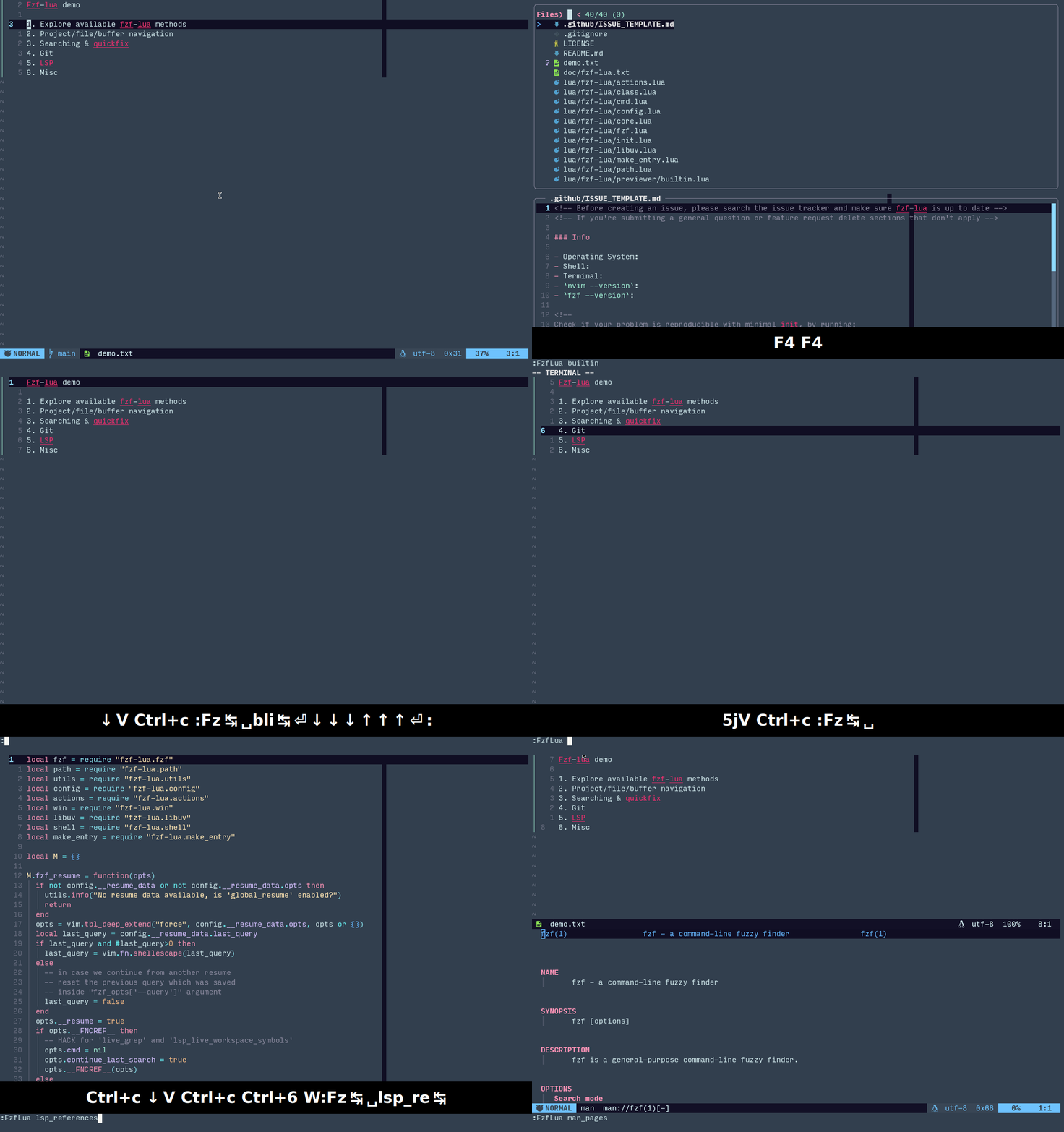
“because you can and you love fzf” - [@junegunn](https://github.com/junegunn)
"fzf changed my command life, it can change yours too, if you allow it" -
[@ibhagwan](https://github.com/ibhagwan)
## Quickstart
To quickly test this plugin without changing your configuration run (will run in its own sandbox
with the default keybinds below):
> [!NOTE]
> it's good practice to first
> [read the script](https://github.com/ibhagwan/fzf-lua/blob/main/scripts/mini.sh)
> before running `sh -c` directly from the web
```sh
sh -c "$(curl -s https://raw.githubusercontent.com/ibhagwan/fzf-lua/main/scripts/mini.sh)"
```
| Key | Command | Key | Command |
| ----------| ------------------| ----------| ------------------|
| `` | buffers | `` | files |
| `` | grep | `` | live_grep |
| `` | builtin commands | `` | neovim help |
## Installation
[](https://luarocks.org/modules/ibhagwan/fzf-lua)
Using [lazy.nvim](https://github.com/folke/lazy.nvim)
```lua
{
"ibhagwan/fzf-lua",
-- optional for icon support
dependencies = { "nvim-tree/nvim-web-devicons" },
-- or if using mini.icons/mini.nvim
-- dependencies = { "nvim-mini/mini.icons" },
opts = {}
}
```
Show dependencies
### Dependencies
- [`neovim`](https://github.com/neovim/neovim/releases) version >= `0.9`
- [`fzf`](https://github.com/junegunn/fzf) version > `0.36`
or [`skim`](https://github.com/skim-rs/skim) binary installed
- [nvim-web-devicons](https://github.com/nvim-tree/nvim-web-devicons)
or [mini.icons](https://github.com/nvim-mini/mini.icons)
(optional)
### Optional dependencies
- [fd](https://github.com/sharkdp/fd) - better `find` utility
- [rg](https://github.com/BurntSushi/ripgrep) - better `grep` utility
- [bat](https://github.com/sharkdp/bat) - syntax highlighted previews when
using fzf's native previewer
- [delta](https://github.com/dandavison/delta) - syntax highlighted git pager
for git status previews
- [nvim-dap](https://github.com/mfussenegger/nvim-dap) - for Debug Adapter
Protocol (DAP) support
- [nvim-treesitter-context](https://github.com/nvim-treesitter/nvim-treesitter-context) - for
viewing treesitter context within the previewer
- [render-markdown.nvim](https://github.com/MeanderingProgrammer/render-markdown.nvim) or
[markview.nvim](https://github.com/OXY2DEV/markview.nvim) - for rendering markdown
files in the previewer
Below are a few optional dependencies for viewing media files (which you need
to configure in `previewer.builtin.extensions`):
- [chafa](https://github.com/hpjansson/chafa) - terminal image previewer
(recommended, supports most file formats)
- [viu](https://github.com/atanunq/viu) - terminal image previewer
- [ueberzugpp](https://github.com/jstkdng/ueberzugpp) - terminal image previewer using X11/Wayland
child windows, sixels, kitty and iterm2
> [!TIP]
> If your terminal supports the kitty graphics protocol (e.g. kitty, ghostty, etc) install
> @folke's [snacks.nvim](https://github.com/folke/snacks.nvim) to render images using the
> `snacks.image` module, it will be auto-detected by fzf-lua and requires no configuration.
### Windows Notes
- [rg](https://github.com/BurntSushi/ripgrep) is required for `grep` and `tags`
- [git](https://git-scm.com/download/win) for Windows is required for `git`
(though installing `git-bash`|`sh` **is not required**).
- Installation of dependencies (fzf, rg, fd, etc) is possible via
[scoop](https://github.com/ScoopInstaller/Install),
[chocolatey](https://chocolatey.org/install) or
[winget-cli](https://github.com/microsoft/winget-cli)
- Although almost everything works on Windows exactly as the \*NIX/OSX check out
the [Windows README](https://github.com/ibhagwan/fzf-lua/blob/main/README-Win.md)
for known issues and limitations.
## Usage
Fzf-lua aims to be as plug and play as possible with sane defaults, you can
run any fzf-lua command like this:
```lua
:lua require("fzf-lua").files()
-- once loaded we can use the global object
:lua FzfLua.files()
-- or the vim command:
:FzfLua files
```
or with arguments:
```lua
:lua FzfLua.files({ cwd = '~/.config' })
-- or using the `FzfLua` vim command:
:FzfLua files cwd=~/.config
```
### Resume
Resuming work from where you left off is as easy as:
```lua
:lua FzfLua.resume()
-- or
:FzfLua resume
```
Alternatively, resuming work on a specific picker:
```lua
:lua FzfLua.files({ resume = true })
-- or
:FzfLua files resume=true
```
### Combining Pickers
Fzf-Lua can combine any of the available pickers into a single display
using the `combine` method, for example file history (oldfiles) and
git-files:
```lua
:lua FzfLua.combine({ pickers = "oldfiles;git_files" })
-- or using the `FzfLua` vim command:
:FzfLua combine pickers=oldfiles;git_files
```
> [!NOTE]
> The first picker options determine the options used by the combined
> picker, that includes formatters, previewer, path_shorten, etc.
> To avoid errors combine only pickers of the same entry types (i.e files)
### Global Picker
Fzf-Lua conveniently comes with a VS-Code like picker by default
(customizable) combining files, buffers and LSP symbols:
|Prefix |Behavior |
|-----------|-----------------------------------|
|`no prefix`|Files |
|`$` |Buffers |
|`@` |LSP Symbols (current buffer) |
|`#` |LSP Symbols (workspace/project) |
```lua
:lua FzfLua.global()
-- or using the `FzfLua` vim command:
:FzfLua global
```
**LIST OF AVAILABLE COMMANDS BELOW** 👇
## Commands
Buffers and Files
### Buffers and Files
| Command | List |
| ---------------- | --------------------------------- |
| `buffers` | open buffers |
| `files` | `find` or `fd` on a path |
| `oldfiles` | opened files history |
| `quickfix` | quickfix list |
| `quickfix_stack` | quickfix stack |
| `loclist` | location list |
| `loclist_stack` | location stack |
| `lines` | open buffers lines |
| `blines` | current buffer lines |
| `treesitter` | current buffer treesitter symbols |
| `tabs` | open tabs |
| `args` | argument list |
Search
### Search
| Command | List |
| ------------------ | ------------------------------------------ |
| `grep` | search for a pattern with `grep` or `rg` |
| `grep_last` | run search again with the last pattern |
| `grep_cword` | search word under cursor |
| `grep_cWORD` | search WORD under cursor |
| `grep_visual` | search visual selection |
| `grep_project` | search all project lines (fzf.vim's `:Rg`) |
| `grep_curbuf` | search current buffer lines |
| `grep_quickfix` | search the quickfix list |
| `grep_loclist` | search the location list |
| `lgrep_curbuf` | live grep current buffer |
| `lgrep_quickfix` | live grep the quickfix list |
| `lgrep_loclist` | live grep the location list |
| `live_grep` | live grep current project |
| `live_grep_resume` | live grep continue last search |
| `live_grep_glob` | live_grep with `rg --glob` support |
| `live_grep_native` | performant version of `live_grep` |
Tags
### Tags
| Command | List |
| ------------------ | ----------------------------- |
| `tags` | search project tags |
| `btags` | search buffer tags |
| `tags_grep` | grep project tags |
| `tags_grep_cword` | `tags_grep` word under cursor |
| `tags_grep_cWORD` | `tags_grep` WORD under cursor |
| `tags_grep_visual` | `tags_grep` visual selection |
| `tags_live_grep` | live grep project tags |
Git
### Git
| Command | List |
| --------------- | ------------------------ |
| `git_files` | `git ls-files` |
| `git_status` | `git status` |
| `git_diff` | `git diff {ref}` |
| `git_hunks` | `git hunks {ref}` |
| `git_commits` | git commit log (project) |
| `git_bcommits` | git commit log (buffer) |
| `git_blame` | git blame (buffer) |
| `git_branches` | git branches |
| `git_worktrees` | git worktrees |
| `git_tags` | git tags |
| `git_stash` | git stash |
LSP / Diagnostics
### LSP/Diagnostics
| Command | List |
| ---------------------------- | -------------------------------- |
| `lsp_references` | References |
| `lsp_definitions` | Definitions |
| `lsp_declarations` | Declarations |
| `lsp_typedefs` | Type Definitions |
| `lsp_implementations` | Implementations |
| `lsp_document_symbols` | Document Symbols |
| `lsp_workspace_symbols` | Workspace Symbols |
| `lsp_live_workspace_symbols` | Workspace Symbols (live query) |
| `lsp_incoming_calls` | Incoming Calls |
| `lsp_outgoing_calls` | Outgoing Calls |
| `lsp_type_sub` | Sub Types |
| `lsp_type_super` | Super Types |
| `lsp_code_actions` | Code Actions |
| `lsp_finder` | All LSP locations, combined view |
| `diagnostics_document` | Document Diagnostics |
| `diagnostics_workspace` | Workspace Diagnostics |
| `lsp_document_diagnostics` | alias to `diagnostics_document` |
| `lsp_workspace_diagnostics` | alias to `diagnostics_workspace` |
Misc
### Misc
| Command | List |
| ---------------------- | --------------------------------------------- |
| `resume` | resume last command/query |
| `builtin` | fzf-lua builtin commands |
| `combine` | combine different fzf-lua pickers |
| `global` | global picker for files,buffers and symbols |
| `profiles` | fzf-lua configuration profiles |
| `helptags` | help tags |
| `manpages` | man pages |
| `colorschemes` | color schemes |
| `awesome_colorschemes` | Awesome Neovim color schemes |
| `highlights` | highlight groups |
| `commands` | neovim commands |
| `command_history` | command history |
| `search_history` | search history |
| `marks` | :marks |
| `jumps` | :jumps |
| `changes` | :changes |
| `registers` | :registers |
| `tagstack` | :tags |
| `autocmds` | :autocmd |
| `nvim_options` | neovim options |
| `keymaps` | key mappings |
| `filetypes` | filetypes |
| `menus` | menus |
| `spellcheck` | misspelled words in buffer |
| `spell_suggest` | spelling suggestions |
| `packadd` | :packadd |
Neovim API
### Neovim API
> `:help vim.ui.select` for more info
| Command | List |
| ---------------------- | -------------------------------------------------------- |
| `register_ui_select` | register fzf-lua as the UI interface for `vim.ui.select` |
| `deregister_ui_select` | de-register fzf-lua with `vim.ui.select` |
nvim-dap
### nvim-dap
> Requires [`nvim-dap`](https://github.com/mfussenegger/nvim-dap)
| Command | List |
| -------------------- | ------------------------------------ |
| `dap_commands` | list,run `nvim-dap` builtin commands |
| `dap_configurations` | list,run debug configurations |
| `dap_breakpoints` | list,delete breakpoints |
| `dap_variables` | active session variables |
| `dap_frames` | active session jump to frame |
Tmux
### tmux
| Command | List |
| -------------- | ----------------------- |
| `tmux_buffers` | list tmux paste buffers |
Zoxide
### zoxide
| Command | List |
| -------------- | ----------------------- |
| `zoxide` | list recent directories |
Completion Functions
### Completion Functions
| Command | List |
| ---------------- | -------------------------------------- |
| `complete_path` | complete path under cursor (incl dirs) |
| `complete_file` | complete file under cursor (excl dirs) |
| `complete_line` | complete line (all open buffers) |
| `complete_bline` | complete line (current buffer only) |
## Customization
> [!NOTE]
> Refer to [OPTIONS](https://github.com/ibhagwan/fzf-lua/blob/main/OPTIONS.md)
> to see detailed usage notes and a comprehensive list of yet more(!) available options.
```lua
require("fzf-lua").setup {
-- MISC GLOBAL SETUP OPTIONS, SEE BELOW
-- fzf_bin = ...,
-- each of these options can also be passed as function that return options table
-- e.g. winopts = function() return { ... } end
winopts = { ... }, -- UI Options
keymap = { ... }, -- Neovim keymaps / fzf binds
actions = { ... }, -- Fzf "accept" binds
fzf_opts = { ... }, -- Fzf CLI flags
fzf_colors = { ... }, -- Fzf `--color` specification
hls = { ... }, -- Highlights
previewers = { ... }, -- Previewers options
-- SPECIFIC COMMAND/PICKER OPTIONS, SEE BELOW
-- files = { ... },
}
```
**DEFAULT OPTIONS OF THE DIFFERENT CONFIG SECTIONS BELOW** 👇
globals
```lua
-- Use skim (or a speccific fzf binary/version) instead of fzf?
-- fzf_bin = 'sk',
-- Padding can help kitty term users with double-width icon rendering
file_icon_padding = '',
-- Uncomment if your terminal/font does not support unicode character
-- 'EN SPACE' (U+2002), the below sets it to 'NBSP' (U+00A0) instead
-- nbsp = '\xc2\xa0',
-- Function override for opening the help window (default bound to ``)
-- Override this function if you want to customize window config of the
-- help window (location, width, border, etc.)
help_open_win = vim.api.nvim_open_win,
```
winopts
```lua
winopts = {
-- split = "belowright new",-- open in a split instead?
-- "belowright new" : split below
-- "aboveleft new" : split above
-- "belowright vnew" : split right
-- "aboveleft vnew : split left
-- Only valid when using a float window
-- (i.e. when 'split' is not defined, default)
height = 0.85, -- window height
width = 0.80, -- window width
row = 0.35, -- window row position (0=top, 1=bottom)
col = 0.50, -- window col position (0=left, 1=right)
-- border argument passthrough to nvim_open_win()
border = "rounded",
-- Backdrop opacity, 0 is fully opaque, 100 is fully transparent (i.e. disabled)
backdrop = 60,
-- title = "Title",
-- title_pos = "center", -- 'left', 'center' or 'right'
-- title_flags = false, -- uncomment to disable title flags
fullscreen = false, -- start fullscreen?
-- enable treesitter highlighting for the main fzf window will only have
-- effect where grep like results are present, i.e. "file:line:col:text"
-- due to highlight color collisions will also override `fzf_colors`
-- set `fzf_colors=false` or `fzf_colors.hl=...` to override
treesitter = {
enabled = true,
fzf_colors = { ["hl"] = "-1:reverse", ["hl+"] = "-1:reverse" }
},
preview = {
-- default = 'bat', -- override the default previewer?
-- default uses the 'builtin' previewer
border = "rounded", -- preview border: accepts both `nvim_open_win`
-- and fzf values (e.g. "border-top", "none")
-- native fzf previewers (bat/cat/git/etc)
-- can also be set to `fun(winopts, metadata)`
wrap = false, -- preview line wrap (fzf's 'wrap|nowrap')
hidden = false, -- start preview hidden
vertical = "down:45%", -- up|down:size
horizontal = "right:60%", -- right|left:size
layout = "flex", -- horizontal|vertical|flex
flip_columns = 100, -- #cols to switch to horizontal on flex
-- Only used with the builtin previewer:
title = true, -- preview border title (file/buf)?
title_pos = "center", -- left|center|right, title alignment
scrollbar = "float", -- `false` or string:'float|border'
-- float: in-window floating border
-- border: in-border "block" marker
scrolloff = -1, -- float scrollbar offset from right
-- applies only when scrollbar = 'float'
delay = 20, -- delay(ms) displaying the preview
-- prevents lag on fast scrolling
winopts = { -- builtin previewer window options
number = true,
relativenumber = false,
cursorline = true,
cursorlineopt = "both",
cursorcolumn = false,
signcolumn = "no",
list = false,
foldenable = false,
foldmethod = "manual",
},
},
on_create = function()
-- called once upon creation of the fzf main window
-- can be used to add custom fzf-lua mappings, e.g:
-- vim.keymap.set("t", "", "", { silent = true, buffer = true })
end,
-- called once _after_ the fzf interface is closed
-- on_close = function() ... end
}
```
keymap
```lua
keymap = {
-- Below are the default binds, setting any value in these tables will override
-- the defaults, to inherit from the defaults change [1] from `false` to `true`
builtin = {
-- neovim `:tmap` mappings for the fzf win
-- true, -- uncomment to inherit all the below in your custom config
[""] = "hide", -- hide fzf-lua, `:FzfLua resume` to continue
[""] = "toggle-help",
[""] = "toggle-fullscreen",
-- Only valid with the 'builtin' previewer
[""] = "toggle-preview-wrap",
[""] = "toggle-preview",
-- Rotate preview clockwise/counter-clockwise
[""] = "toggle-preview-cw",
-- Preview toggle behavior default/extend
[""] = "toggle-preview-behavior",
-- `ts-ctx` binds require `nvim-treesitter-context`
[""] = "toggle-preview-ts-ctx",
[""] = "preview-ts-ctx-dec",
[""] = "preview-ts-ctx-inc",
[""] = "preview-reset",
[""] = "preview-page-down",
[""] = "preview-page-up",
[""] = "preview-down",
[""] = "preview-up",
},
fzf = {
-- fzf '--bind=' options
-- true, -- uncomment to inherit all the below in your custom config
["ctrl-z"] = "abort",
["ctrl-u"] = "unix-line-discard",
["ctrl-f"] = "half-page-down",
["ctrl-b"] = "half-page-up",
["ctrl-a"] = "beginning-of-line",
["ctrl-e"] = "end-of-line",
["alt-a"] = "toggle-all",
["alt-g"] = "first",
["alt-G"] = "last",
-- Only valid with fzf previewers (bat/cat/git/etc)
["f3"] = "toggle-preview-wrap",
["f4"] = "toggle-preview",
["shift-down"] = "preview-page-down",
["shift-up"] = "preview-page-up",
},
},
```
actions
```lua
actions = {
-- Below are the default actions, setting any value in these tables will override
-- the defaults, to inherit from the defaults change [1] from `false` to `true`
files = {
-- true, -- uncomment to inherit all the below in your custom config
-- Pickers inheriting these actions:
-- files, git_files, git_status, grep, lsp, oldfiles, quickfix, loclist,
-- tags, btags, args, buffers, tabs, lines, blines
-- `file_edit_or_qf` opens a single selection or sends multiple selection to quickfix
-- replace `enter` with `file_edit` to open all files/bufs whether single or multiple
-- replace `enter` with `file_switch_or_edit` to attempt a switch in current tab first
["enter"] = FzfLua.actions.file_edit_or_qf,
["ctrl-s"] = FzfLua.actions.file_split,
["ctrl-v"] = FzfLua.actions.file_vsplit,
["ctrl-t"] = FzfLua.actions.file_tabedit,
["alt-q"] = FzfLua.actions.file_sel_to_qf,
["alt-Q"] = FzfLua.actions.file_sel_to_ll,
["alt-i"] = FzfLua.actions.toggle_ignore,
["alt-h"] = FzfLua.actions.toggle_hidden,
["alt-f"] = FzfLua.actions.toggle_follow,
},
}
```
fzf_opts
```lua
fzf_opts = {
-- options are sent as `=`
-- set to `false` to remove a flag
-- set to `true` for a no-value flag
-- for raw args use `fzf_args` instead
["--ansi"] = true,
["--info"] = "inline-right", -- fzf < v0.42 = "inline"
["--height"] = "100%",
["--layout"] = "reverse",
["--border"] = "none",
["--highlight-line"] = true, -- fzf >= v0.53
}
-- Only used when fzf_bin = "fzf-tmux", by default opens as a
-- popup 80% width, 80% height (note `-p` requires tmux > 3.2)
-- and removes the sides margin added by `fzf-tmux` (fzf#3162)
-- for more options run `fzf-tmux --help`
-- NOTE: since fzf v0.53 / sk v0.15 it is recommended to use
-- native tmux integration by adding the below to `fzf_opts`
-- fzf_opts = { ["--tmux"] = "center,80%,60%" }
fzf_tmux_opts = { ["-p"] = "80%,80%", ["--margin"] = "0,0" },
```
fzf_colors
> [!NOTE]
> See the [Fzf Colors](#fzf-colors) section for more info.
```lua
--
-- Set fzf's terminal colorscheme (optional)
--
-- Set to `true` to automatically generate an fzf's colorscheme from
-- Neovim's current colorscheme:
-- fzf_colors = true,
--
-- Building a custom colorscheme, has the below specifications:
-- If rhs is of type "string" rhs will be passed raw, e.g.:
-- `["fg"] = "underline"` will be translated to `--color fg:underline`
-- If rhs is of type "table", the following convention is used:
-- [1] "what" field to extract from the hlgroup, i.e "fg", "bg", etc.
-- [2] Neovim highlight group(s), can be either "string" or "table"
-- when type is "table" the first existing highlight group is used
-- [3+] any additional fields are passed raw to fzf's command line args
-- Example of a "fully loaded" color option:
-- `["fg"] = { "fg", { "NonExistentHl", "Comment" }, "underline", "bold" }`
-- Assuming `Comment.fg=#010101` the resulting fzf command line will be:
-- `--color fg:#010101:underline:bold`
-- NOTE: to pass raw arguments `fzf_opts["--color"]` or `fzf_args`
-- NOTE: below is an example, not the defaults:
fzf_colors = {
true, -- inherit fzf colors that aren't specified below from
-- the auto-generated theme similar to `fzf_colors=true`
["fg"] = { "fg", "CursorLine" },
["bg"] = { "bg", "Normal" },
["hl"] = { "fg", "Comment" },
["fg+"] = { "fg", "Normal", "underline" },
["bg+"] = { "bg", { "CursorLine", "Normal" } },
["hl+"] = { "fg", "Statement" },
["info"] = { "fg", "PreProc" },
["prompt"] = { "fg", "Conditional" },
["pointer"] = { "fg", "Exception" },
["marker"] = { "fg", "Keyword" },
["spinner"] = { "fg", "Label" },
["header"] = { "fg", "Comment" },
["gutter"] = "-1",
},
```
hls
> [!NOTE]
> See the [highlights](#highlights) section below for all available highlight groups.
```lua
hls = {
normal = "Normal" -- highlight group for normal fg/bg
preview_normal = "Normal" -- highlight group for preview fg/bg
...
}
```
previewers
```lua
previewers = {
cat = {
cmd = "cat",
args = "-n",
},
bat = {
cmd = "bat",
args = "--color=always --style=numbers,changes",
},
head = {
cmd = "head",
args = nil,
},
git_diff = {
-- if required, use `{file}` for argument positioning
-- e.g. `cmd_modified = "git diff --color HEAD {file} | cut -c -30"`
cmd_deleted = "git diff --color HEAD --",
cmd_modified = "git diff --color HEAD",
cmd_untracked = "git diff --color --no-index /dev/null",
-- git-delta is automatically detected as pager, set `pager=false`
-- to disable, can also be set under 'git.status.preview_pager'
},
man = {
-- NOTE: remove the `-c` flag when using man-db
-- replace with `man -P cat %s | col -bx` on OSX
cmd = "man -c %s | col -bx",
},
builtin = {
syntax = true, -- preview syntax highlight?
syntax_limit_l = 0, -- syntax limit (lines), 0=nolimit
syntax_limit_b = 1024*1024, -- syntax limit (bytes), 0=nolimit
limit_b = 1024*1024*10, -- preview limit (bytes), 0=nolimit
-- previewer treesitter options:
-- enable specific filetypes with: `{ enabled = { "lua" } }
-- exclude specific filetypes with: `{ disabled = { "lua" } }
-- disable `nvim-treesitter-context` with `context = false`
-- disable fully with: `treesitter = false` or `{ enabled = false }`
treesitter = {
enabled = true,
disabled = {},
-- nvim-treesitter-context config options
context = { max_lines = 1, trim_scope = "inner" }
},
-- By default, the main window dimensions are calculated as if the
-- preview is visible, when hidden the main window will extend to
-- full size. Set the below to "extend" to prevent the main window
-- from being modified when toggling the preview.
toggle_behavior = "default",
-- Title transform function, by default only displays the tail
-- title_fnamemodify = function(s) return vim.fn.fnamemodify(s, ":t") end,
-- preview extensions using a custom shell command:
-- for example, use `viu` for image previews
-- will do nothing if `viu` isn't executable
extensions = {
-- neovim terminal only supports `viu` block output
["png"] = { "viu", "-b" },
-- by default the filename is added as last argument
-- if required, use `{file}` for argument positioning
["svg"] = { "chafa", "{file}" },
["jpg"] = { "ueberzug" },
},
-- if using `ueberzug` in the above extensions map
-- set the default image scaler, possible scalers:
-- false (none), "crop", "distort", "fit_contain",
-- "contain", "forced_cover", "cover"
-- https://github.com/seebye/ueberzug
ueberzug_scaler = "cover",
-- render_markdown.nvim integration, enabled by default for markdown
render_markdown = { enabled = true, filetypes = { ["markdown"] = true } },
-- snacks.images integration, enabled by default
snacks_image = { enabled = true, render_inline = true },
},
-- Code Action previewers, default is "codeaction" (set via `lsp.code_actions.previewer`)
-- "codeaction_native" uses fzf's native previewer, recommended when combined with git-delta
codeaction = {
-- options for vim.diff(): https://neovim.io/doc/user/lua.html#vim.diff()
diff_opts = { ctxlen = 3 },
},
codeaction_native = {
diff_opts = { ctxlen = 3 },
-- git-delta is automatically detected as pager, set `pager=false`
-- to disable, can also be set under 'lsp.code_actions.preview_pager'
-- recommended styling for delta
--pager = [[delta --width=$COLUMNS --hunk-header-style="omit" --file-style="omit"]],
},
}
```
picker options
```lua
-- use `defaults` (table or function) if you wish to set "global-picker" defaults
-- for example, using "mini.icons" globally and open the quickfix list at the top
-- defaults = {
-- file_icons = "mini",
-- copen = "topleft copen",
-- },
files = {
-- previewer = "bat", -- uncomment to override previewer
-- (name from 'previewers' table)
-- set to 'false' to disable
prompt = 'Files❯ ',
multiprocess = true, -- run command in a separate process
git_icons = false, -- show git icons?
file_icons = true, -- show file icons (true|"devicons"|"mini")?
color_icons = true, -- colorize file|git icons
-- path_shorten = 1, -- 'true' or number, shorten path?
-- Uncomment for custom vscode-like formatter where the filename is first:
-- e.g. "fzf-lua/previewer/fzf.lua" => "fzf.lua previewer/fzf-lua"
-- formatter = "path.filename_first",
-- executed command priority is 'cmd' (if exists)
-- otherwise auto-detect prioritizes `fd`:`rg`:`find`
-- default options are controlled by 'fd|rg|find|_opts'
-- cmd = "rg --files",
find_opts = [[-type f \! -path '*/.git/*']],
rg_opts = [[--color=never --hidden --files -g "!.git"]],
fd_opts = [[--color=never --hidden --type f --type l --exclude .git]],
dir_opts = [[/s/b/a:-d]],
-- by default, cwd appears in the header only if {opts} contain a cwd
-- parameter to a different folder than the current working directory
-- uncomment if you wish to force display of the cwd as part of the
-- query prompt string (fzf.vim style), header line or both
-- cwd_header = true,
cwd_prompt = true,
cwd_prompt_shorten_len = 32, -- shorten prompt beyond this length
cwd_prompt_shorten_val = 1, -- shortened path parts length
toggle_ignore_flag = "--no-ignore", -- flag toggled in `actions.toggle_ignore`
toggle_hidden_flag = "--hidden", -- flag toggled in `actions.toggle_hidden`
toggle_follow_flag = "-L", -- flag toggled in `actions.toggle_follow`
hidden = true, -- enable hidden files by default
follow = false, -- do not follow symlinks by default
no_ignore = false, -- respect ".gitignore" by default
absolute_path = false, -- display absolute paths
actions = {
-- inherits from 'actions.files', here we can override
-- or set bind to 'false' to disable a default action
-- uncomment to override `actions.file_edit_or_qf`
-- ["enter"] = actions.file_edit,
-- custom actions are available too
-- ["ctrl-y"] = function(selected) print(selected[1]) end,
}
},
git = {
files = {
prompt = 'GitFiles❯ ',
cmd = 'git ls-files --exclude-standard',
multiprocess = true, -- run command in a separate process
git_icons = true, -- show git icons?
file_icons = true, -- show file icons (true|"devicons"|"mini")?
color_icons = true, -- colorize file|git icons
-- force display the cwd header line regardless of your current working
-- directory can also be used to hide the header when not wanted
-- cwd_header = true
},
status = {
prompt = 'GitStatus❯ ',
cmd = "git -c color.status=false --no-optional-locks status --porcelain=v1 -u",
multiprocess = true, -- run command in a separate process
file_icons = true,
color_icons = true,
previewer = "git_diff",
-- git-delta is automatically detected as pager, uncomment to disable
-- preview_pager = false,
actions = {
-- actions inherit from 'actions.files' and merge
["right"] = { fn = actions.git_unstage, reload = true },
["left"] = { fn = actions.git_stage, reload = true },
["ctrl-x"] = { fn = actions.git_reset, reload = true },
},
-- If you wish to use a single stage|unstage toggle instead
-- using 'ctrl-s' modify the 'actions' table as shown below
-- actions = {
-- ["right"] = false,
-- ["left"] = false,
-- ["ctrl-x"] = { fn = actions.git_reset, reload = true },
-- ["ctrl-s"] = { fn = actions.git_stage_unstage, reload = true },
-- },
},
diff = {
cmd = "git --no-pager diff --name-only {ref}",
ref = "HEAD",
preview = "git diff {ref} {file}",
-- git-delta is automatically detected as pager, uncomment to disable
-- preview_pager = false,
file_icons = true,
color_icons = true,
fzf_opts = { ["--multi"] = true },
},
hunks = {
cmd = "git --no-pager diff --color=always {ref}",
ref = "HEAD",
file_icons = true,
color_icons = true,
fzf_opts = {
["--multi"] = true,
["--delimiter"] = ":",
["--nth"] = "3..",
},
},
commits = {
prompt = 'Commits❯ ',
cmd = [[git log --color --pretty=format:"%C(yellow)%h%Creset ]]
.. [[%Cgreen(%><(12)%cr%><|(12))%Creset %s %C(blue)<%an>%Creset"]],
preview = "git show --color {1}",
-- git-delta is automatically detected as pager, uncomment to disable
-- preview_pager = false,
actions = {
["enter"] = actions.git_checkout,
-- remove `exec_silent` or set to `false` to exit after yank
["ctrl-y"] = { fn = actions.git_yank_commit, exec_silent = true },
},
},
bcommits = {
prompt = 'BCommits❯ ',
-- default preview shows a git diff vs the previous commit
-- if you prefer to see the entire commit you can use:
-- git show --color {1} --rotate-to={file}
-- {1} : commit SHA (fzf field index expression)
-- {file} : filepath placement within the commands
cmd = [[git log --color --pretty=format:"%C(yellow)%h%Creset ]]
.. [[%Cgreen(%><(12)%cr%><|(12))%Creset %s %C(blue)<%an>%Creset" {file}]],
preview = "git show --color {1} -- {file}",
-- git-delta is automatically detected as pager, uncomment to disable
-- preview_pager = false,
actions = {
["enter"] = actions.git_buf_edit,
["ctrl-s"] = actions.git_buf_split,
["ctrl-v"] = actions.git_buf_vsplit,
["ctrl-t"] = actions.git_buf_tabedit,
["ctrl-y"] = { fn = actions.git_yank_commit, exec_silent = true },
},
},
blame = {
prompt = "Blame> ",
cmd = [[git blame --color-lines {file}]],
preview = "git show --color {1} -- {file}",
-- git-delta is automatically detected as pager, uncomment to disable
-- preview_pager = false,
actions = {
["enter"] = actions.git_goto_line,
["ctrl-s"] = actions.git_buf_split,
["ctrl-v"] = actions.git_buf_vsplit,
["ctrl-t"] = actions.git_buf_tabedit,
["ctrl-y"] = { fn = actions.git_yank_commit, exec_silent = true },
},
},
branches = {
prompt = 'Branches❯ ',
cmd = "git branch --all --color",
preview = "git log --graph --pretty=oneline --abbrev-commit --color {1}",
remotes = "local", -- "detach|local", switch behavior for remotes
actions = {
["enter"] = actions.git_switch,
["ctrl-x"] = { fn = actions.git_branch_del, reload = true },
["ctrl-a"] = { fn = actions.git_branch_add, field_index = "{q}", reload = true },
},
-- If you wish to add branch and switch immediately
-- cmd_add = { "git", "checkout", "-b" },
cmd_add = { "git", "branch" },
-- If you wish to delete unmerged branches add "--force"
-- cmd_del = { "git", "branch", "--delete", "--force" },
cmd_del = { "git", "branch", "--delete" },
},
tags = {
prompt = "Tags> ",
cmd = [[git for-each-ref --color --sort="-taggerdate" --format ]]
.. [["%(color:yellow)%(refname:short)%(color:reset) ]]
.. [[%(color:green)(%(taggerdate:relative))%(color:reset)]]
.. [[ %(subject) %(color:blue)%(taggername)%(color:reset)" refs/tags]],
preview = [[git log --graph --color --pretty=format:"%C(yellow)%h%Creset ]]
.. [[%Cgreen(%><(12)%cr%><|(12))%Creset %s %C(blue)<%an>%Creset" {1}]],
actions = { ["enter"] = actions.git_checkout },
},
stash = {
prompt = 'Stash> ',
cmd = "git --no-pager stash list",
preview = "git --no-pager stash show --patch --color {1}",
actions = {
["enter"] = actions.git_stash_apply,
["ctrl-x"] = { fn = actions.git_stash_drop, reload = true },
},
},
icons = {
["M"] = { icon = "M", color = "yellow" },
["D"] = { icon = "D", color = "red" },
["A"] = { icon = "A", color = "green" },
["R"] = { icon = "R", color = "yellow" },
["C"] = { icon = "C", color = "yellow" },
["T"] = { icon = "T", color = "magenta" },
["?"] = { icon = "?", color = "magenta" },
-- override git icons?
-- ["M"] = { icon = "★", color = "red" },
-- ["D"] = { icon = "✗", color = "red" },
-- ["A"] = { icon = "+", color = "green" },
},
},
grep = {
prompt = 'Rg❯ ',
input_prompt = 'Grep For❯ ',
multiprocess = true, -- run command in a separate process
git_icons = false, -- show git icons?
file_icons = true, -- show file icons (true|"devicons"|"mini")?
color_icons = true, -- colorize file|git icons
-- executed command priority is 'cmd' (if exists)
-- otherwise auto-detect prioritizes `rg` over `grep`
-- default options are controlled by 'rg|grep_opts'
-- cmd = "rg --vimgrep",
grep_opts = "--binary-files=without-match --line-number --recursive --color=auto --perl-regexp -e",
rg_opts = "--column --line-number --no-heading --color=always --smart-case --max-columns=4096 -e",
hidden = false, -- disable hidden files by default
follow = false, -- do not follow symlinks by default
no_ignore = false, -- respect ".gitignore" by default
-- Uncomment to use the rg config file `$RIPGREP_CONFIG_PATH`
-- RIPGREP_CONFIG_PATH = vim.env.RIPGREP_CONFIG_PATH
--
-- Set to 'true' to always parse globs in both 'grep' and 'live_grep'
-- search strings will be split using the 'glob_separator' and translated
-- to '--iglob=' arguments, requires 'rg'
-- can still be used when 'false' by calling 'live_grep_glob' directly
rg_glob = true, -- default to glob parsing with `rg`
glob_flag = "--iglob", -- for case sensitive globs use '--glob'
glob_separator = "%s%-%-", -- query separator pattern (lua): ' --'
-- advanced usage: for custom argument parsing define
-- 'rg_glob_fn' to return a pair:
-- first returned argument is the new search query
-- second returned argument are additional rg flags
-- rg_glob_fn = function(query, opts)
-- ...
-- return new_query, flags
-- end,
--
-- Enable with narrow term width, split results to multiple lines
-- NOTE: multiline requires fzf >= v0.53 and is ignored otherwise
-- multiline = 1, -- Display as: PATH:LINE:COL\nTEXT
-- multiline = 2, -- Display as: PATH:LINE:COL\nTEXT\n
actions = {
-- actions inherit from 'actions.files' and merge
-- this action toggles between 'grep' and 'live_grep'
["ctrl-g"] = { actions.grep_lgrep }
-- uncomment to enable '.gitignore' toggle for grep
-- ["ctrl-r"] = { actions.toggle_ignore }
},
no_header = false, -- hide grep|cwd header?
no_header_i = false, -- hide interactive header?
},
args = {
prompt = 'Args❯ ',
files_only = true,
-- actions inherit from 'actions.files' and merge
actions = { ["ctrl-x"] = { fn = actions.arg_del, reload = true } },
},
oldfiles = {
prompt = 'History❯ ',
cwd_only = false,
stat_file = true, -- verify files exist on disk
-- can also be a lua function, for example:
-- stat_file = FzfLua.utils.file_is_readable,
-- stat_file = function() return true end,
include_current_session = false, -- include bufs from current session
},
buffers = {
prompt = 'Buffers❯ ',
file_icons = true, -- show file icons (true|"devicons"|"mini")?
color_icons = true, -- colorize file|git icons
sort_lastused = true, -- sort buffers() by last used
show_unloaded = true, -- show unloaded buffers
cwd_only = false, -- buffers for the cwd only
cwd = nil, -- buffers list for a given dir
actions = {
-- actions inherit from 'actions.files' and merge
-- by supplying a table of functions we're telling
-- fzf-lua to not close the fzf window, this way we
-- can resume the buffers picker on the same window
-- eliminating an otherwise unaesthetic win "flash"
["ctrl-x"] = { fn = actions.buf_del, reload = true },
}
},
tabs = {
prompt = 'Tabs❯ ',
tab_title = "Tab",
tab_marker = "<<",
locate = true, -- position cursor at current window
file_icons = true, -- show file icons (true|"devicons"|"mini")?
color_icons = true, -- colorize file|git icons
actions = {
-- actions inherit from 'actions.files' and merge
["enter"] = actions.buf_switch,
["ctrl-x"] = { fn = actions.buf_del, reload = true },
},
fzf_opts = {
-- hide tabnr
["--delimiter"] = "[\\):]",
["--with-nth"] = '2..',
},
},
-- `blines` has the same defaults as `lines` aside from prompt and `show_bufname`
lines = {
prompt = 'Lines❯ ',
file_icons = true,
show_bufname = true, -- display buffer name
show_unloaded = true, -- show unloaded buffers
show_unlisted = false, -- exclude 'help' buffers
no_term_buffers = true, -- exclude 'term' buffers
sort_lastused = true, -- sort by most recent
winopts = { treesitter = true }, -- enable TS highlights
fzf_opts = {
-- do not include bufnr in fuzzy matching
-- tiebreak by line no.
["--multi"] = true,
["--delimiter"] = "[\t]",
["--tabstop"] = "1",
["--tiebreak"] = "index",
["--with-nth"] = "2..",
["--nth"] = "4..",
},
},
tags = {
prompt = 'Tags❯ ',
ctags_file = nil, -- auto-detect from tags-option
multiprocess = true,
file_icons = true,
color_icons = true,
-- 'tags_live_grep' options, `rg` prioritizes over `grep`
rg_opts = "--no-heading --color=always --smart-case",
grep_opts = "--color=auto --perl-regexp",
fzf_opts = { ["--tiebreak"] = "begin" },
actions = {
-- actions inherit from 'actions.files' and merge
-- this action toggles between 'grep' and 'live_grep'
["ctrl-g"] = { actions.grep_lgrep }
},
no_header = false, -- hide grep|cwd header?
no_header_i = false, -- hide interactive header?
},
btags = {
prompt = 'BTags❯ ',
ctags_file = nil, -- auto-detect from tags-option
ctags_autogen = true, -- dynamically generate ctags each call
multiprocess = true,
file_icons = false,
rg_opts = "--color=never --no-heading",
grep_opts = "--color=never --perl-regexp",
fzf_opts = { ["--tiebreak"] = "begin" },
-- actions inherit from 'actions.files'
},
colorschemes = {
prompt = 'Colorschemes❯ ',
live_preview = true, -- apply the colorscheme on preview?
actions = { ["enter"] = actions.colorscheme },
winopts = { height = 0.55, width = 0.30, },
-- uncomment to ignore colorschemes names (lua patterns)
-- ignore_patterns = { "^delek$", "^blue$" },
},
awesome_colorschemes = {
prompt = 'Colorschemes❯ ',
live_preview = true, -- apply the colorscheme on preview?
max_threads = 5, -- max download/update threads
winopts = { row = 0, col = 0.99, width = 0.50 },
fzf_opts = {
["--multi"] = true,
["--delimiter"] = "[:]",
["--with-nth"] = "3..",
["--tiebreak"] = "index",
},
actions = {
["enter"] = actions.colorscheme,
["ctrl-g"] = { fn = actions.toggle_bg, exec_silent = true },
["ctrl-r"] = { fn = actions.cs_update, reload = true },
["ctrl-x"] = { fn = actions.cs_delete, reload = true },
},
},
keymaps = {
prompt = "Keymaps> ",
winopts = { preview = { layout = "vertical" } },
fzf_opts = { ["--tiebreak"] = "index", },
-- by default, we ignore and mappings
-- set `ignore_patterns = false` to disable filtering
ignore_patterns = { "^", "^" },
show_desc = true,
show_details = true,
actions = {
["enter"] = actions.keymap_apply,
["ctrl-s"] = actions.keymap_split,
["ctrl-v"] = actions.keymap_vsplit,
["ctrl-t"] = actions.keymap_tabedit,
},
},
nvim_options = {
prompt = "Nvim Options> ",
separator = "│", -- separator between option name and value
color_values = true, -- colorize boolean values
actions = {
["enter"] = { fn = actions.nvim_opt_edit_local, reload = true },
["alt-enter"] = { fn = actions.nvim_opt_edit_global, reload = true },
},
},
quickfix = {
file_icons = true,
valid_only = false, -- select among only the valid quickfix entries
},
quickfix_stack = {
prompt = "Quickfix Stack> ",
marker = ">", -- current list marker
},
lsp = {
prompt_postfix = '❯ ', -- will be appended to the LSP label
-- to override use 'prompt' instead
cwd_only = false, -- LSP/diagnostics for cwd only?
async_or_timeout = 5000, -- timeout(ms) or 'true' for async calls
file_icons = true,
git_icons = false,
jump1 = true, -- skip the UI when result is a single entry
jump1_action = FzfLua.actions.file_edit
-- The equivalent of using `includeDeclaration` in lsp buf calls, e.g:
-- :lua vim.lsp.buf.references({includeDeclaration = false})
includeDeclaration = true, -- include current declaration in LSP context
-- settings for 'lsp_{document|workspace|lsp_live_workspace}_symbols'
symbols = {
-- lsp_query = "foo" -- query passed to the LSP directly
-- query = "bar" -- query passed to fzf prompt for fuzzy matching
locate = false, -- attempt to position cursor at current symbol
async_or_timeout = true, -- symbols are async by default
symbol_style = 1, -- style for document/workspace symbols
-- false: disable, 1: icon+kind
-- 2: icon only, 3: kind only
-- NOTE: icons are extracted from
-- vim.lsp.protocol.CompletionItemKind
-- icons for symbol kind
-- see https://microsoft.github.io/language-server-protocol/specifications/lsp/3.17/specification/#symbolKind
-- see https://github.com/neovim/neovim/blob/829d92eca3d72a701adc6e6aa17ccd9fe2082479/runtime/lua/vim/lsp/protocol.lua#L117
symbol_icons = {
File = "",
Module = "",
Namespace = "",
Package = "",
Class = "",
Method = "",
Property = "",
Field = "",
Constructor = "",
Enum = "",
Interface = "",
Function = "",
Variable = "",
Constant = "",
String = "",
Number = "",
Boolean = "",
Array = "",
Object = "",
Key = "",
Null = "",
EnumMember = "",
Struct = "",
Event = "",
Operator = "",
TypeParameter = "",
},
-- colorize using Treesitter '@' highlight groups ("@function", etc).
-- or 'false' to disable highlighting
symbol_hl = function(s) return "@" .. s:lower() end,
-- additional symbol formatting, works with or without style
symbol_fmt = function(s, opts) return "[" .. s .. "]" end,
-- prefix child symbols. set to any string or `false` to disable
child_prefix = true,
-- prepend parent to symbol, set to any string or `false` to disable
-- parent_postfix = ".",
fzf_opts = { ["--tiebreak"] = "begin" },
},
code_actions = {
prompt = 'Code Actions> ',
async_or_timeout = 5000,
-- when git-delta is installed use "codeaction_native" for beautiful diffs
-- try it out with `:FzfLua lsp_code_actions previewer=codeaction_native`
-- scroll up to `previewers.codeaction{_native}` for more previewer options
previewer = "codeaction",
},
finder = {
prompt = "LSP Finder> ",
file_icons = true,
color_icons = true,
async = true, -- async by default
silent = true, -- suppress "not found"
separator = "| ", -- separator after provider prefix, `false` to disable
includeDeclaration = true, -- include current declaration in LSP context
-- by default display all LSP locations
-- to customize, duplicate table and delete unwanted providers
providers = {
{ "references", prefix = FzfLua.utils.ansi_codes.blue("ref ") },
{ "definitions", prefix = FzfLua.utils.ansi_codes.green("def ") },
{ "declarations", prefix = FzfLua.utils.ansi_codes.magenta("decl") },
{ "typedefs", prefix = FzfLua.utils.ansi_codes.red("tdef") },
{ "implementations", prefix = FzfLua.utils.ansi_codes.green("impl") },
{ "incoming_calls", prefix = FzfLua.utils.ansi_codes.cyan("in ") },
{ "outgoing_calls", prefix = FzfLua.utils.ansi_codes.yellow("out ") },
{ "type_sub", prefix = FzfLua.utils.utils.ansi_codes.cyan("sub ") },
{ "type_super", prefix = FzfLua.utils.utils.ansi_codes.yellow("supr") },
},
}
},
diagnostics ={
prompt = 'Diagnostics❯ ',
cwd_only = false,
file_icons = false,
git_icons = false,
color_headings = true, -- use diag highlights to color source & filepath
diag_icons = true, -- display icons from diag sign definitions
diag_source = true, -- display diag source (e.g. [pycodestyle])
diag_code = true, -- display diag code (e.g. [undefined])
icon_padding = '', -- add padding for wide diagnostics signs
multiline = 2, -- split heading and diag to separate lines
-- severity_only: keep any matching exact severity
-- severity_limit: keep any equal or more severe (lower)
-- severity_bound: keep any equal or less severe (higher)
},
marks = {
marks = "", -- filter vim marks with a lua pattern
-- for example if you want to only show user defined marks
-- you would set this option as %a this would match characters from [A-Za-z]
-- or if you want to show only numbers you would set the pattern to %d (0-9).
},
complete_path = {
cmd = nil, -- default: auto detect fd|rg|find
complete = { ["enter"] = actions.complete },
word_pattern = nil, -- default: "[^%s\"']*"
},
complete_file = {
cmd = nil, -- default: auto detect rg|fd|find
file_icons = true,
color_icons = true,
word_pattern = nil,
-- actions inherit from 'actions.files' and merge
actions = { ["enter"] = actions.complete },
-- previewer hidden by default
winopts = { preview = { hidden = true } },
},
zoxide = {
cmd = "zoxide query --list --score",
scope = "global", -- cd action scope "local|win|tab"
git_root = false, -- auto-detect git root
formatter = "path.dirname_first",
fzf_opts = {
["--no-multi"] = true,
["--delimiter"] = "[\t]",
["--tabstop"] = "4",
["--tiebreak"] = "end,index", -- prefer dirs ending with search term
["--nth"] = "2..", -- exclude score from fuzzy matching
},
actions = { enter = actions.cd }
},
-- uncomment to use fzf native previewers
-- (instead of using a neovim floating window)
-- manpages = { previewer = "man_native" },
-- helptags = { previewer = "help_native" },
```
> [!TIP]
> To experiment with different options without modifying the global config, options
> can be sent as inline parameters to the function calls. Expand below to see examples
> of inline customization and Refer to
> [OPTIONS](https://github.com/ibhagwan/fzf-lua/blob/main/OPTIONS.md) for yet more examples.
CLICK FOR EXAMPLES OF INLINE CUSTOMIZATION
#### Inline Customization
Different `fzf` layout:
```lua
:lua FzfLua.files({ fzf_opts = {['--layout'] = 'reverse-list'} })
-- Or via the vimL command
:FzfLua files fzf_opts.--layout=reverse-list
```
Using `files` with a different command and working directory:
```lua
:lua FzfLua.files({ prompt="LS> ", cmd = "ls", cwd="~/.config" })
-- Or via the vimL command
:FzfLua files prompt="LS>\ " cmd=ls cwd=~/.config
```
Using `live_grep` with `git grep`:
```lua
:lua FzfLua.live_grep({ cmd = "git grep --line-number --column --color=always" })
```
`spell_suggest` with non-default window size relative to cursor:
```lua
:lua FzfLua.spell_suggest({ winopts = { height=0.33, width=0.33, relative="cursor" } })
-- Or via the vimL command
:FzfLua spell_suggest winopts={height=0.33,width=0.33,relative=cursor}
:FzfLua spell_suggest winopts={height=0.33,width=0.33} winopts.relative=cursor
```
### Profiles
Conveniently, fzf-lua comes with a set of preconfigured profiles if you do not want to tinker with
customization.
Use `:FzfLua profiles` to experiment with the different profiles, once you've found what
you like and wish to make the profile persist, send a `string` argument at the first index
of the table sent to the `setup` function:
> [!TIP]
> `setup` can be called multiple times for profile "live" switching,
> see [profiles](https://github.com/ibhagwan/fzf-lua/tree/main/lua/fzf-lua/profiles)
> page for more info.
```lua
require('fzf-lua').setup({'fzf-native'})
```
You can also start with a profile as "baseline" and customize it, for example,
telescope defaults with `bat` previewer:
```lua
:lua require"fzf-lua".setup({"telescope",winopts={preview={default="bat"}}})
```
Combining of profiles is also available by sending table instead of string as
the first argument:
```lua
:lua require"fzf-lua".setup({{"telescope","fzf-native"},winopts={fullscreen=true}})
```
> [!TIP]
> The default profile is a combination of border-fused+hide profiles,
> without the "hide" profile pressing esc terminates the fzf process
> which makes for an imperfect resume limited to resuming only the
> picker/query (without cursor position, selection, etc), to restore
> the default esc behavior combine any existing profile with "hide"
> by using a table in `opts[1]`:
> ```lua
> require("fzf-lua").setup({
> { "fzf-native", "hide" },
> -- your other settings here
> })
> ```
#### Coming from fzf.vim?
Easy! just use the `fzf-vim` profile:
```lua
require('fzf-lua').setup({'fzf-vim'})
```
> [!TIP]
> Using the `fzf-vim` profile will automatically create `fzf.vim`'s user commands
> (i.e. `:Files`, `:Rg`), if you wish to use a different profile you can create the same
> user commands by running `:FzfLua setup_fzfvim_cmds`.
CLICK TO SEE THE AVAILABLE PROFILES
#### Available Profiles
| Profile | Details |
| ----------------- | --------------------------------------------------------------------------------------------------- |
| `default` | fzf-lua defaults, uses neovim "builtin" buffer previewer and devicons (if available) |
| `default-title` | fzf-lua defaults, using title for picker info (default on neovim >= 0.9) |
| `default-prompt` | fzf-lua defaults, using prompt for picker info (default on neovim < 0.9) |
| `fzf-native` | utilizes fzf's native previewing ability in the terminal where possible using `bat` for previews |
| `fzf-tmux` | similar to `fzf-native` and opens in a tmux popup (requires tmux > 3.2) |
| `fzf-vim` | closest to `fzf.vim`'s defaults (+icons), also sets up user commands (`:Files`, `:Rg`, etc) |
| `max-perf` | similar to `fzf-native` and disables icons globally for max performance |
| `telescope` | closest match to telescope defaults in look and feel and keybinds |
| `skim` | uses [`skim`](https://github.com/skim-rs/skim) as an fzf alternative, (requires the `sk` binary) |
| `borderless` | borderless and minimalistic seamless look & feel |
| `borderless-full` | borderless with description in window title (instead of prompt) |
| `border-fused` | single border around both fzf and the previewer |
| `ivy` | UI at bottom, similar to telescope's ivy layout |
| `hide` | send fzf process to background instead of termination |
### Extensibility
Fzf-lua can be easily extended and customised for your own needs: have a look at a full list of
examples and plugins browsing the 💡[Wiki](https://github.com/ibhagwan/fzf-lua/wiki/Advanced) 💡
Have ideas for new pickers, plugins or extensions? Add it to the wiki, it's open edit!
### Insert-mode completion
Fzf-lua comes with a set of completion functions for paths/files and lines from open buffers as
well as custom completion, for example, set path/completion using ``:
```lua
vim.keymap.set({ "n", "v", "i" }, "",
function() FzfLua.complete_path() end,
{ silent = true, desc = "Fuzzy complete path" })
```
Or with a custom command and preview:
> [!NOTE]
> only `complete_file` supports a previewer as `complete_path` mixes both files and directories.
```lua
vim.keymap.set({ "i" }, "",
function()
FzfLua.complete_file({
cmd = "rg --files",
winopts = { preview = { hidden = true } }
})
end, { silent = true, desc = "Fuzzy complete file" })
```
CLICK FOR CUSTOM COMPLETION DETAILS
#### Custom Completion
Every fzf-lua function can be easily converted to a completion function by sending
`complete = true` in the options:
> By default fzf-lua will insert the entry at the cursor location as if you used
> `p` to paste the selected entry.
```lua
FzfLua.fzf_exec({"foo", "bar"}, {complete = true})
```
Custom completion is possible using a custom completion callback, the example below
will replace the text from the current cursor column with the selected entry:
```lua
FzfLua.fzf_exec({"foo", "bar"}, {
-- @param selected: the selected entry or entries
-- @param opts: fzf-lua caller/provider options
-- @param line: originating buffer completed line
-- @param col: originating cursor column location
-- @return newline: will replace the current buffer line
-- @return newcol?: optional, sets the new cursor column
complete = function(selected, opts, line, col)
local newline = line:sub(1, col) .. selected[1]
-- set cursor to EOL, since `nvim_win_set_cursor`
-- is 0-based we have to lower the col value by 1
return newline, #newline - 1
end
})
```
### Highlights
Highlight groups can be easily customized either via the lua API:
```lua
:lua vim.api.nvim_set_hl(0, "FzfLuaBorder", { link = "FloatBorder" })
```
or via `setup`:
```lua
require('fzf-lua').setup {
hls = { border = "FloatBorder" }
}
```
or temporarily in the call:
```lua
:lua FzfLua.files({ hls={preview_title="IncSearch"} })
-- vimL equivalent
:FzfLua files hls.preview_title=IncSearch
```
CLICK TO SEE AVAILABLE HIGHLIGHT GROUPS
#### Highlight groups
FzfLua conveniently creates the below highlights, each hlgroup can be
temporarily overridden by its corresponding `winopts` option:
| Highlight Group | Default | Override Via | Notes |
| ----------------------- | ---------------- | -------------------- | ------------------------------------- |
| FzfLuaNormal | Normal | `hls.normal` | Main win `fg/bg` |
| FzfLuaBorder | Normal | `hls.border` | Main win border |
| FzfLuaTitle | FzfLuaNormal | `hls.title` | Main win title |
| FzfLuaTitleFlags | CursorLine | `hls.title_flags` | Main win title flags |
| FzfLuaBackdrop | \*bg=Black | `hls.backdrop` | Backdrop color |
| FzfLuaPreviewNormal | FzfLuaNormal | `hls.preview_normal` | Builtin preview `fg/bg` |
| FzfLuaPreviewBorder | FzfLuaBorder | `hls.preview_border` | Builtin preview border |
| FzfLuaPreviewTitle | FzfLuaTitle | `hls.preview_title` | Builtin preview title |
| FzfLuaCursor | Cursor | `hls.cursor` | Builtin preview `Cursor` |
| FzfLuaCursorLine | CursorLine | `hls.cursorline` | Builtin preview `Cursorline` |
| FzfLuaCursorLineNr | CursorLineNr | `hls.cursorlinenr` | Builtin preview `CursorLineNr` |
| FzfLuaSearch | IncSearch | `hls.search` | Builtin preview search matches |
| FzfLuaScrollBorderEmpty | FzfLuaBorder | `hls.scrollborder_e` | Builtin preview `border` scroll empty |
| FzfLuaScrollBorderFull | FzfLuaBorder | `hls.scrollborder_f` | Builtin preview `border` scroll full |
| FzfLuaScrollFloatEmpty | PmenuSbar | `hls.scrollfloat_e` | Builtin preview `float` scroll empty |
| FzfLuaScrollFloatFull | PmenuThumb | `hls.scrollfloat_f` | Builtin preview `float` scroll full |
| FzfLuaHelpNormal | FzfLuaNormal | `hls.help_normal` | Help win `fg/bg` |
| FzfLuaHelpBorder | FzfLuaBorder | `hls.help_border` | Help win border |
| FzfLuaHeaderBind | \*BlanchedAlmond | `hls.header_bind` | Header keybind |
| FzfLuaHeaderText | \*Brown1 | `hls.header_text` | Header text |
| FzfLuaPathColNr | \*CadetBlue1 | `hls.path_colnr` | Path col nr (`qf,lsp,diag`) |
| FzfLuaPathLineNr | \*LightGreen | `hls.path_linenr` | Path line nr (`qf,lsp,diag`) |
| FzfLuaBufName | Directory | `hls.buf_name` | Buffer name (`lines`) |
| FzfLuaBufId | TabLine | `hls.buf_id` | Buffer ID (`lines`) |
| FzfLuaBufNr | \*BlanchedAlmond | `hls.buf_nr` | Buffer number (`buffers,tabs`) |
| FzfLuaBufLineNr | LineNr | `hls.buf_linenr` | Buffer line nr (`lines,blines`) |
| FzfLuaBufFlagCur | \*Brown1 | `hls.buf_flag_cur` | Buffer line (`buffers`) |
| FzfLuaBufFlagAlt | \*CadetBlue1 | `hls.buf_flag_alt` | Buffer line (`buffers`) |
| FzfLuaTabTitle | \*LightSkyBlue1 | `hls.tab_title` | Tab title (`tabs`) |
| FzfLuaTabMarker | \*BlanchedAlmond | `hls.tab_marker` | Tab marker (`tabs`) |
| FzfLuaDirIcon | Directory | `hls.dir_icon` | Paths directory icon |
| FzfLuaDirPart | Comment | `hls.dir_part` | Path formatters directory hl group |
| FzfLuaFilePart | @none | `hls.file_part` | Path formatters file hl group |
| FzfLuaLivePrompt | \*PaleVioletRed1 | `hls.live_prompt` | "live" queries prompt text |
| FzfLuaLiveSym | \*PaleVioletRed1 | `hls.live_sym` | LSP live symbols query match |
| FzfLuaCmdEx | Statement | `hls.cmd_ex` | Ex commands in `commands` |
| FzfLuaCmdBuf | Added | `hls.cmd_buf` | Buffer commands in `commands` |
| FzfLuaCmdGlobal | Directory | `hls.cmd_global` | Global commands in `commands` |
| FzfLuaFzfNormal | FzfLuaNormal | `fzf.normal` | fzf's `fg\|bg` |
| FzfLuaFzfCursorLine | FzfLuaCursorLine | `fzf.cursorline` | fzf's `fg+\|bg+` |
| FzfLuaFzfMatch | Special | `fzf.match` | fzf's `hl+` |
| FzfLuaFzfBorder | FzfLuaBorder | `fzf.border` | fzf's `border` |
| FzfLuaFzfScrollbar | FzfLuaFzfBorder | `fzf.scrollbar` | fzf's `scrollbar` |
| FzfLuaFzfSeparator | FzfLuaFzfBorder | `fzf.separator` | fzf's `separator` |
| FzfLuaFzfGutter | FzfLuaNormal | `fzf.gutter` | fzf's `gutter` (hl `bg` is used) |
| FzfLuaFzfHeader | FzfLuaTitle | `fzf.header` | fzf's `header` |
| FzfLuaFzfInfo | NonText | `fzf.info` | fzf's `info` |
| FzfLuaFzfPointer | Special | `fzf.pointer` | fzf's `pointer` |
| FzfLuaFzfMarker | FzfLuaFzfPointer | `fzf.marker` | fzf's `marker` |
| FzfLuaFzfSpinner | FzfLuaFzfPointer | `fzf.spinner` | fzf's `spinner` |
| FzfLuaFzfPrompt | Special | `fzf.prompt` | fzf's `prompt` |
| FzfLuaFzfQuery | FzfLuaNormal | `fzf.query` | fzf's `header` |
*Not a highlight group, RGB color from `nvim_get_color_map`
CLICK FOR FZF COLORS DETAILS
#### Fzf Colors
Fzf's terminal colors are controlled by fzf's `--color` flag which can be
configured during setup via `fzf_colors`.
Set to `true` to have fzf-lua automatically generate an fzf colorscheme from
your current Neovim colorscheme:
```lua
require("fzf-lua").setup({ fzf_colors = true })
-- Or in the direct call options
:lua FzfLua.files({ fzf_colors = true })
:FzfLua files fzf_colors=true
```
Customizing the fzf colorscheme (see `man fzf` for all color options):
```lua
require('fzf-lua').setup {
fzf_colors = {
-- First existing highlight group will be used
-- values in 3rd+ index will be passed raw
-- i.e: `--color fg+:#010101:bold:underline`
["fg+"] = { "fg" , { "Comment", "Normal" }, "bold", "underline" },
-- It is also possible to pass raw values directly
["gutter"] = "-1"
}
}
```
Conveniently, fzf-lua can also be configured using fzf.vim's `g:fzf_colors`, i.e:
```lua
-- Similarly, first existing highlight group will be used
:lua vim.g.fzf_colors = { ["gutter"] = { "bg", "DoesNotExist", "IncSearch" } }
```
However, the above doesn't allow combining both neovim highlights and raw args,
if you're only using fzf-lua we can hijack `g:fzf_colors` to accept fzf-lua style
values (i.e. table at 2nd index and 3rd+ raw args):
```lua
:lua vim.g.fzf_colors = { ["fg+"] = { "fg", { "ErrorMsg" }, "bold", "underline" } }
```
## Credits
Big thank you to all those I borrowed code/ideas from, I read so many configs
and plugin codes that I probably forgot where I found some samples from so if
I missed your name feel free to contact me and I'll add it below:
+ [@junegunn](https://github.com/junegunn/) for creating the magical
[fzf](https://github.com/junegunn/fzf) and
[fzf.vim](https://github.com/junegunn/fzf.vim)
- [@vijaymarupudi](https://github.com/vijaymarupudi/) for the wonderful
[nvim-fzf](https://github.com/vijaymarupudi/nvim-fzf) plugin which started
this endeavour
- [@tjdevries](https://github.com/tjdevries/) for too many great things to
list here and borrowing code from
[nvim-telescope](https://github.com/nvim-telescope/telescope.nvim)
- [@lukas-reineke](https://github.com/lukas-reineke) for inspiration after browsing
[dotfiles](https://github.com/lukas-reineke/dotfiles)
- [@sindrets](https://github.com/sindrets) for borrowing utilities from
[diffview.nvim](https://github.com/sindrets/diffview.nvim)
- [@kevinhwang91](https://github.com/kevinhwang91) for inspiring the builtin
previewer code while using [nvim-bqf](https://github.com/kevinhwang91/nvim-bqf)